Capabilities
Introduction
Today’s web browsers offer a richer web experience than ever before. They are not limited to the basic capabilities of the browser itself; they also make use of lower-level features and the operating system on which they run.
These capabilities are made available via web platform APIs, including well-established ones such as Clipboard, File System and Service Worker, as well as new ones in the experimental phase that have the potential to transform the creation of web apps.
In the age of AI, browsers cannot afford to be left behind—they must propose sustainable, accessible AI APIs for all, in order to democratize the use of AI. Consequently, we will discuss the initial use of these new Chrome- and Edge-specific APIs in the Capabilities chapter this year.
Methodology
This chapter, as in previous years, used the HTTP Archive’s public dataset of millions of pages. These pages were archived as both desktop and mobile, since some sites serve different content based on what device is requesting the page.
How does the HTTP Archive detect capabilities?
The HTTP Archive crawler parses the source code for all of these pages to determine which APIs were (potentially) used on the pages using regular expressions, such as /navigator\.share\s*\(/g.
The way it works can cause some problems when it comes to detecting things: it may underreport some APIs used as it can’t detect code that may exist due to minification, for example, when navigator was minified to n; or it may overreport occurrences of APIs because it doesn’t run code to see if an API is actually used.
Even with these limitations, as in other editions of this chapter, we should still be able to have a fairly good overview of what capabilities are used on the web nowadays.
Eighty-six total regular expressions for supported capabilities exist; view this source file based on the Fugu API data project to see all the expressions used.
Project Fugu
Before we dive into the data, we would like to express our gratitude to Project Fugu, a cross-company initiative aimed at achieving feature parity between web and mobile/desktop applications.
Thanks to this initiative, we can benefit from many features that belong to applications only by exposing platform-specific capabilities to the web.
If you would like to know which APIs are exposed in this context, please visit the Chrome Developers blog to find out more about the Capabilities Project.
Top 7 most used features
The following section highlights the seven most widely used web platform capabilities observed in the 2025 dataset. These features represent a mix of long-established APIs and more recent additions that have reached broad, practical adoption. Their prevalence across both mobile and desktop pages reflects where the web platform is most commonly relied upon today, and provides a useful baseline for understanding which capabilities have become foundational building blocks for modern web applications.
Compression Streams API
The Compression Streams API allows web apps to compress and decompress data using widely supported formats like GZIP and Deflate (and as of recent also Brotli), directly in the browser. This enables more efficient transfer and storage of large data without relying on server-side processing.
Data is processed via CompressionStream and DecompressionStream objects, which integrate with the web’s streaming APIs (ReadableStream, WritableStream).
const text = "Hello Web Almanac 2025!";
const stream = new Blob([text]).stream();
const compressed = stream.pipeThrough(new CompressionStream("gzip"));
const decompressed = compressed.pipeThrough(new DecompressionStream("gzip"));
const result = await new Response(decompressed).text();

console.log(result); // "Hello Web Almanac 2025!"
Since May 2023, this feature works across the latest devices and browser versions. It’s available in Chromium-based browsers, Safari and Firefox, but might not work on older devices or other browsers.
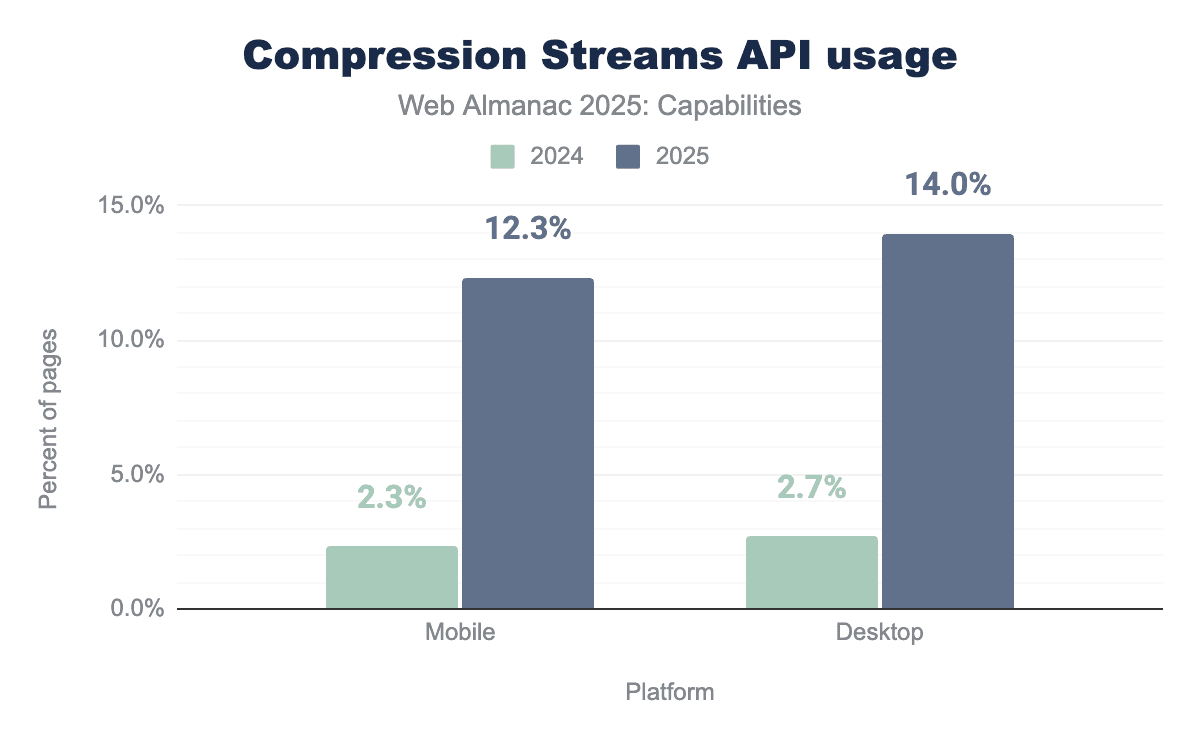
Adoption of the Compression Streams API grew sharply between 2024 and 2025, becoming the most widely used API in 2025 and overtaking Clipboard, which had been in the lead for three years.
On mobile, usage jumped from 2.3% to 12.3%, and on desktop from 2.7% to 14.0%. This steep rise aligns with the API becoming widely supported across all major engines in the last two years, removing a technical blocker and letting developers drop JavaScript polyfills and rely on native gzip/deflate compression.
The API is particularly appealing for data-heavy applications where streaming efficiency matters, which explains its strong adoption curve.
Clipboard API
The Clipboard API provides asynchronous read and write access to the system clipboard. It supports plain text, HTML, images, and other formats, though support may vary across browsers.
Security restrictions require clipboard operations to be triggered by a user gesture (like a click).
// Write text
await navigator.clipboard.writeText("Hello from Web Almanac!");

// Read text
const text = await navigator.clipboard.readText();

console.log(text); // "Hello from Web Almanac!"
The Async Clibpoard API is supported in Chromium-based browsers, Safari and Firefox. Only Chromium-based browsers have support for richer clipboard data, like web custom formats.
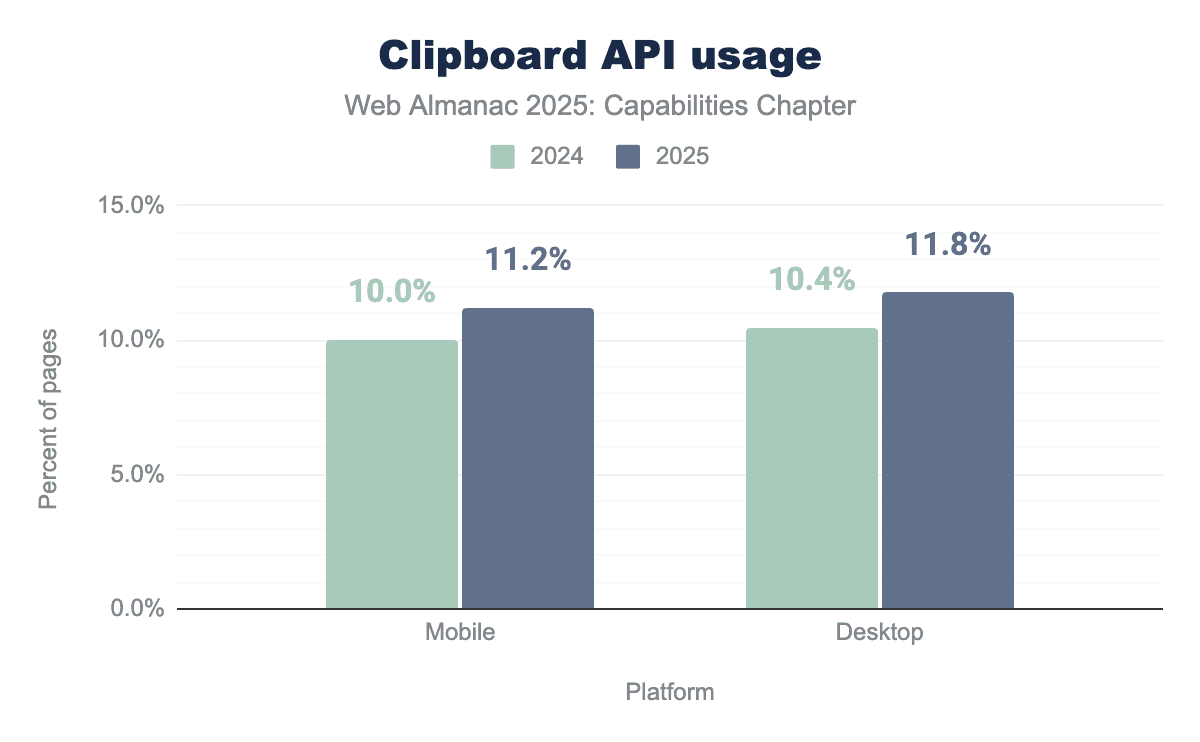
The Clipboard API continues to see steady growth. Mobile adoption increased from 10.0% in 2024 to 11.2% in 2025, while desktop rose from 10.4% to 11.8%. This reflects developers increasingly moving away from legacy execCommand() clipboard hacks and embracing the async API for copy buttons and paste workflows. The year-over-year growth is moderate, underscoring that the Clipboard API is now a well-established utility rather than an emerging capability.
Web Share API
The Web Share API allows web apps to invoke the device’s native sharing mechanism, enabling users to share text, URLs, and files with other installed apps (for example, messaging, email, or social apps).
The main method is navigator.share(), which takes an object with the data to share. The optional navigator.canShare() method can be used to check whether the provided data (especially files) is shareable before attempting.
The API requires a user gesture (such as a click) and will trigger the platform’s share sheet, letting the user select the app to share with.
const data = {
  title: "Web Almanac 2025",
  text: "Check out the latest edition of the Web Almanac!",
  url: "https://almanac.httparchive.org/en/2025/",
};

if (navigator.canShare && navigator.canShare(data)) {
  try {
    await navigator.share(data);
    console.log("Data shared successfully!");
  } catch (err) {
    console.error("Share failed:", err);
  }
} else {
  console.warn("Sharing not supported on this device.");
}
The Web Share API is supported in modern Chrome, Edge, and Safari. Firefox does not implement it (although it exists behind a flag).
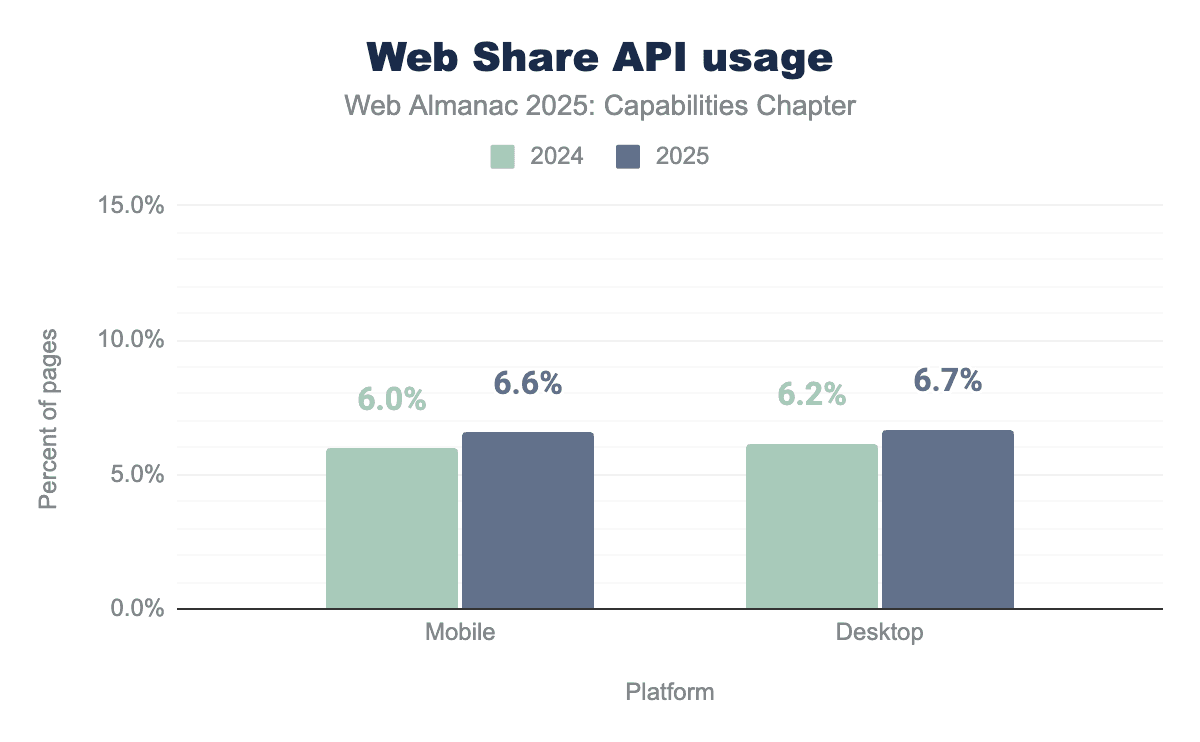
There have been minor adjustments to the usage of one of the most widely adopted APIs, which currently occupies third place in the ranking of most used APIs.
Adoption of the Web Share API remained largely stable, with mobile rising slightly from 6.0% in 2024 to 6.6% in 2025, and desktop from 6.2% to 6.7%. Adoption was mostly flat, but with a slight uptick. This API has now reached a state of maturity and stability across major browsers; these incremental gains are indicative of natural fluctuations rather than significant growth.
Device Memory API
The Device Memory API exposes an approximation of the device’s RAM, in gigabytes, through navigator.deviceMemory. This enables developers to tailor experiences (for example, serving lighter pages to low-memory devices).
The value is rounded and coarse-grained for privacy reasons.
console.log(navigator.deviceMemory);
// Example output: 8 (for an 8 GB device)
Available in Chromium-based browsers; not supported in Safari or Firefox.
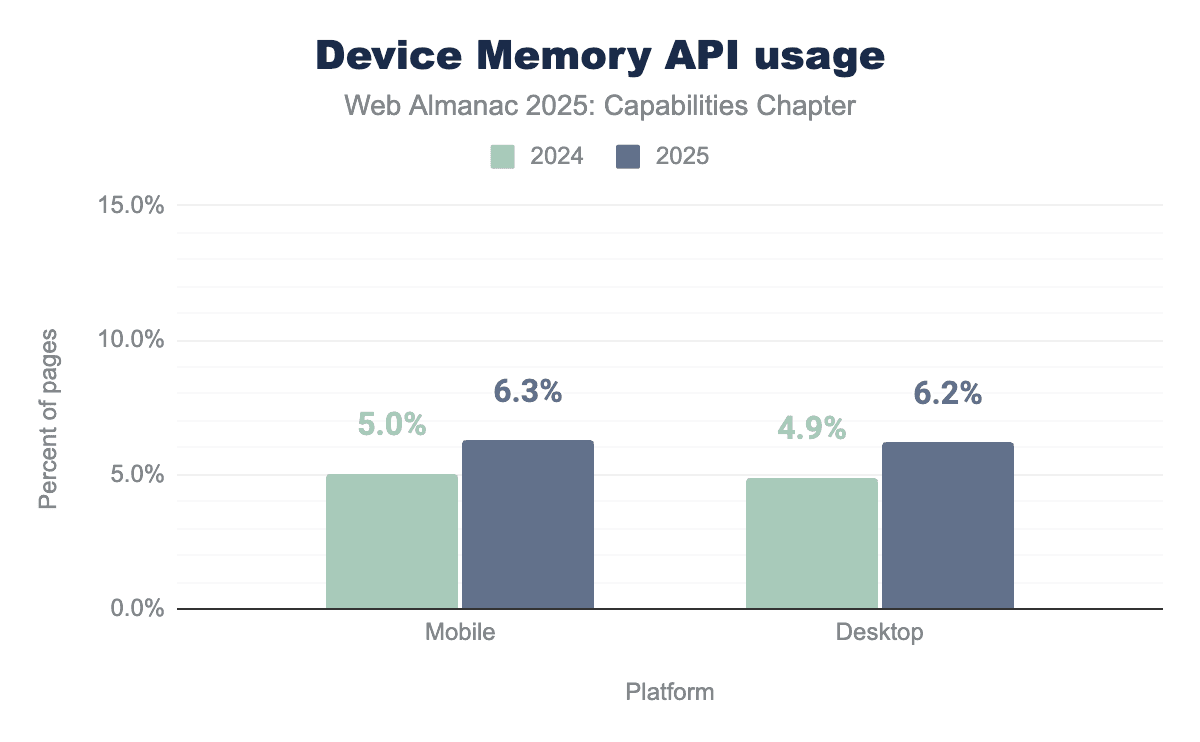
The Device Memory API saw a noticeable uptick, moving from 5.0% to 6.3% on mobile and 4.9% to 6.2% on desktop. This increase reflects broader recognition of the API’s usefulness for adaptive performance strategies, where developers can serve lighter assets to low-memory devices. Another possible explanation could be that developers try to determine if AI inference can reasonably run on a device based on the available memory before downloading an AI model.
More developers are leveraging navigator.deviceMemory to deliver lighter experiences on low-memory devices. While adoption is still limited by its Chromium-only availability and its intentionally coarse-grained values, the growth shows that sites concerned with performance are starting to make practical use of it.
Media Session API
The Media Session API lets developers customize media notifications and integrate with platform-level media controls (for example, lock screen, headset buttons, or smart displays).
Using navigator.mediaSession, apps can define metadata and actions for media playback.
navigator.mediaSession.metadata = new MediaMetadata({
  title: "Web Almanac Podcast",
  artist: "HTTP Archive",
  album: "2025 Edition",
});

navigator.mediaSession.setActionHandler("play", () => {
  audio.play();
});
Widely supported in Chromium-based browsers and Safari. Firefox has no support for some important features.
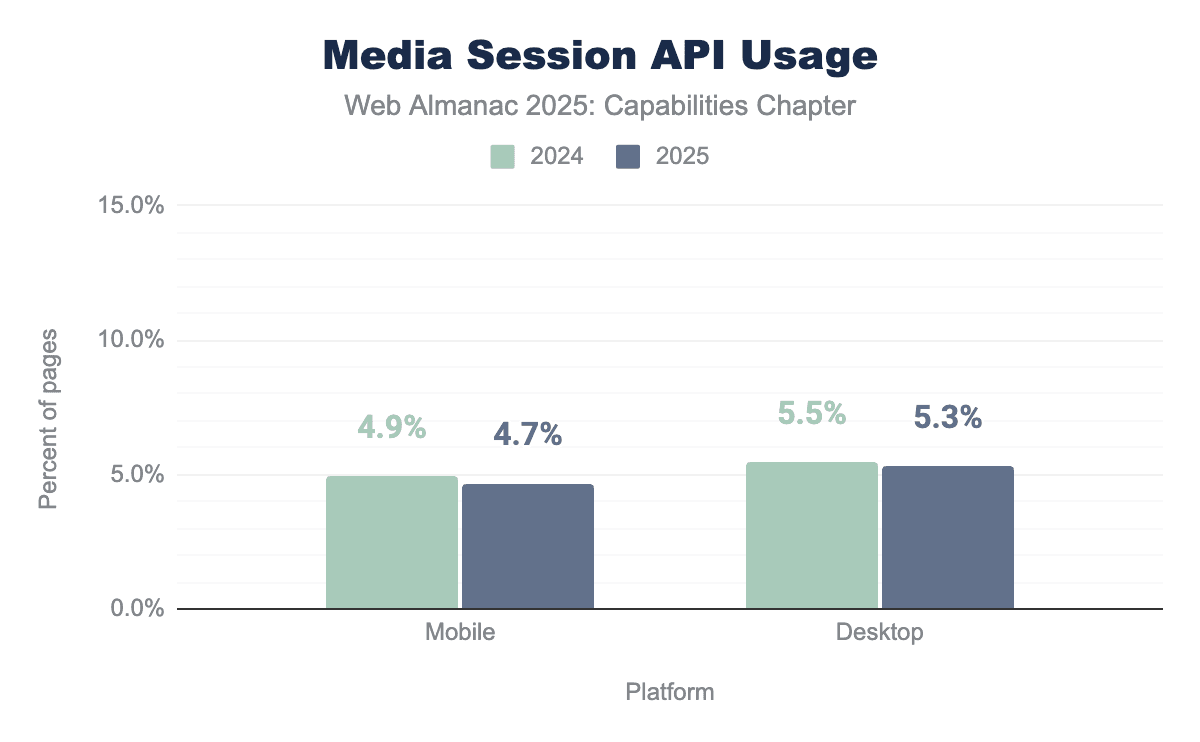
The Media Session API experienced a small decline. Mobile adoption dropped from 4.9% in 2024 to 4.7% in 2025, while desktop fell slightly from 5.5% to 5.3%. These differences are minor and likely reflect natural fluctuations in the dataset rather than meaningful shifts. Overall, usage remains steady, concentrated in audio and video sites like music players and podcast apps where integration with platform-level media controls improves user experience.
Add to Home Screen
This capability allows users to install a Progressive Web App (PWA) as an app-like experience on their device.
When a site meets installability criteria, Chrome and other browsers may show an install badge (for example, an icon in the address bar or an “Install” menu option) that lets users add the app to their home screen or install it as a standalone app, while it also supports manual installation flows for sites that don’t meet those criteria. Chrome further experiments with ML-driven install prompts on Android to help users discover installable experiences.
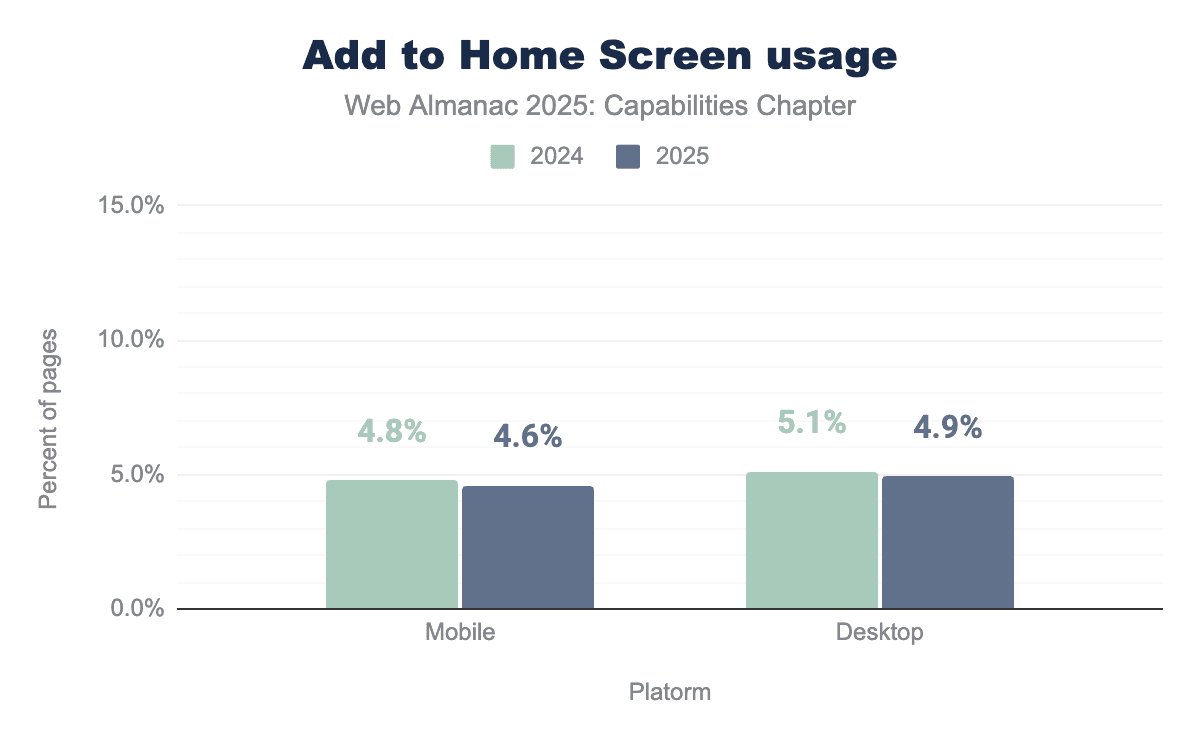
Adoption of Add to Home Screen capabilities remained flat, with mobile usage decreasing slightly from 4.8% in 2024 to 4.6% in 2025, and desktop from 5.1% to 4.9%. These small declines likely reflect normal variation rather than a real downward trend. Growth is constrained by platform fragmentation: Android and Chromium-based browsers expose install prompts, while iOS relies on a manual Safari-driven install flow. This limits widespread uptake despite PWA adoption.
Media Capabilities API
The Media Capabilities API allows developers to query whether the browser can efficiently decode and play a given audio or video configuration.
It provides insights into smoothness and power efficiency for adaptive media streaming.
const config = {
  type: "file",
  audio: {
    contentType: "audio/mp3",
    channels: 2,
    bitrate: 132700,
    samplerate: 5200,
  },
};

const result = await navigator.mediaCapabilities.decodingInfo(config);

console.log(result.supported); // true or false
console.log(result.powerEfficient); // true or false
Widely available, it works across many devices and browser versions. It’s been available across browsers since January 2020. But still some parts of this feature may have varying levels of support in browsers like Safari.
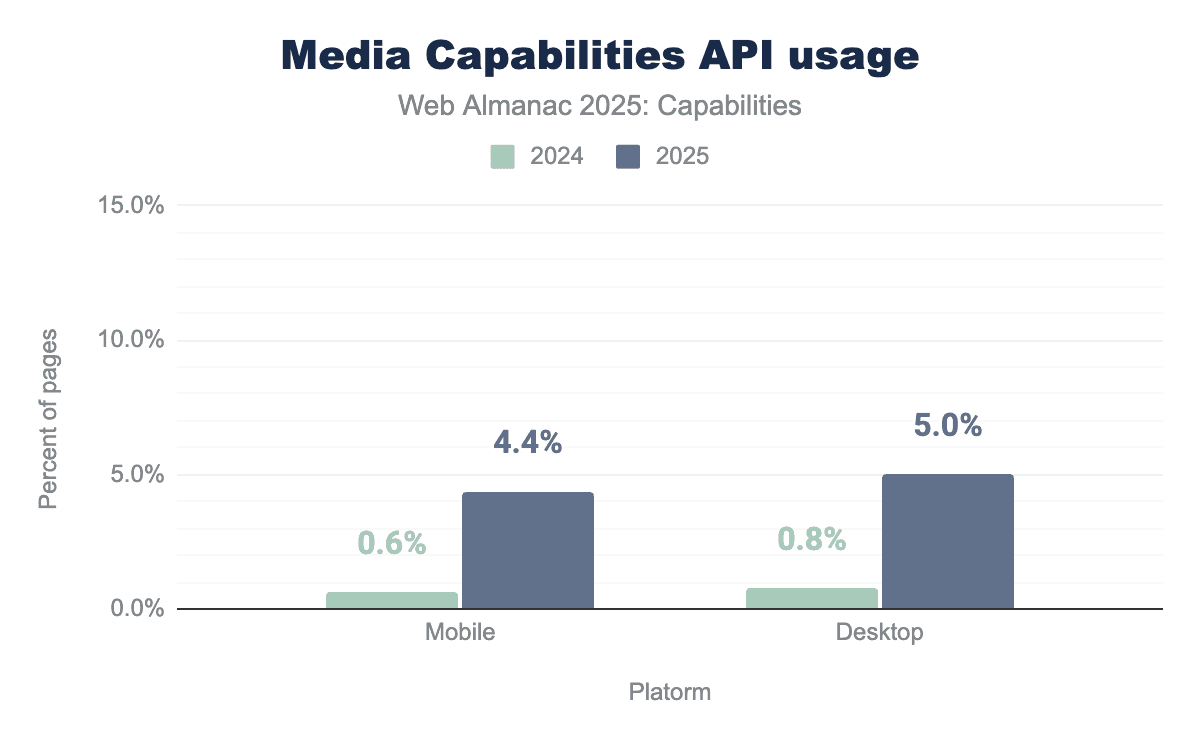
The Media Capabilities API saw dramatic growth over the past year. Mobile adoption rose from just 0.61% in 2024 to 4.37% in 2025, while desktop usage jumped from 0.75% to 5.00%. This surge suggests rapid adoption by streaming platforms, which use decodingInfo() to determine codec support, playback smoothness, and power efficiency before selecting the best stream for a device. Unlike many of the other APIs that saw only incremental shifts, Media Capabilities is clearly on a fast adoption trajectory driven by media-heavy sites.
New features over the past year
One of the most notable changes in the Capabilities chapter for 2025 is the first appearance of browser-native AI and language APIs. While AI has been widely used on the web through external services and libraries for years, these APIs represent a shift toward built-in, standardized language capabilities provided directly by the browser.
Built-in AI APIs
As of 2025, only a subset of these APIs is available outside of experimental contexts: LanguageDetector, Translator, Summarizer, and Prompt (limited to extensions). Other built-in AI capabilities—such as the regular Prompt API, Writer, Rewriter, and Proofreader—remain experimental, requiring additional setup and operating under temporary or limited token-based constraints. This distinction is important when interpreting usage data, as experimental features are less likely to appear in production websites.
| Built-in AI API | Desktop | Mobile |
|---|---|---|
| LanguageDetector | 0.28% | 0.26% |
| Prompt | 0.08% | 0.09% |
| Translator | 0.28% | 0.26% |
| Summarizer | 0.13% | 0.14% |
Despite their availability, usage across the web remains very limited. As shown in the table below, each of these APIs appears on well under 1% of pages in both desktop and mobile datasets, however, actual support is currently limited to most desktop platforms (Windows, macOS, Linux, and ChromeOS on Chromebook Plus devices). Language Detector and Translator are the most commonly observed, each used by roughly 0.28% of desktop pages and 0.26% of mobile pages, while Prompt and Summarizer show even smaller footprints.
The low adoption rates are expected. These APIs are new, often still evolving, and currently supported by a limited set of browsers, Chrome and Edge. Their inclusion in the 2025 dataset is nonetheless significant: it marks the first measurable presence of browser-native AI primitives in the HTTP Archive, establishing a baseline for tracking how built-in AI capabilities evolve on the web in future years.
See also the Generative AI chapter for more discussion on these APIs and AI on the web.
Conclusion
The 2025 Capabilities analysis shows a web platform that continues to mature in both breadth and depth. Established APIs such as Compression Streams and Async Clipboard grew significantly or steadily, reflecting broader cross-engine support and developers replacing legacy patterns. Features like Web Share, Media Session, and Add to Home Screen remained stable, with only minor year-over-year fluctuations. At the same time, specialist APIs such as Media Capabilities saw notable uptake among media-heavy sites, suggesting deeper adoption in vertical use cases.
Most compellingly, 2025 marks the first measurable footprint of browser-native AI and language APIs—including LanguageDetector, Translator, Prompt, and Summarizer—even if each appears on well under 1% of pages. Their presence establishes a baseline for future adoption, hinting at a web platform increasingly ready to expose higher-level capabilities.
Looking ahead, growth will likely be shaped by continued standardization and real-world utility: as browser support solidifies and developer tooling evolves, new APIs may move from experimental curiosity to practical building blocks for richer, smarter web applications.
